I made some changes to the source code described in my October 2000 Dr. Dobb's Journal article in response to suggestions from a reader. Click for the revised source code. This source code, the sorting-controls source and the STL source may be used in any program, including commercial ones. Please credit me in your program's help file or documentation.
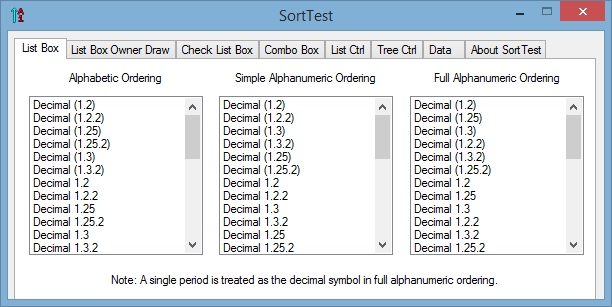
In the following image, the list boxes show the differences between alphabetic, simple-alphanumeric and full-alphanumeric ordering. Running SortTest will show these differences also in owner-draw list boxes, check list boxes, combo boxes, list controls and tree controls. On the Data page, you can edit the list of strings to sort, save the list to a file and load it from a file. In addition, you can insert, add or delete individual strings to or from a page's controls.
| Item | File Name | Size | API Docs | Notes |
|---|---|---|---|---|
| SortTest | SortTest.exe | 93 KB | Demo program | |
| Simple-alphanumeric ordering | StringSANOrder.zip | 2 KB | StringOrder | Sort controls default to alphabetic ordering. |
| Sort list box | SortListBox.zip | 11 KB | SortListBox | Includes adjusting horizontal extent. |
| Sort list box owner draw | SortListBoxOD.zip | 14 KB | SortListBoxOD | Includes adjusting horizontal extent. |
| Sort check list box | SortCheckListBox.zip | 11 KB | SortCheckListBox | Includes adjusting horizontal extent. |
| Sort combo box | SortComboBox.zip | 8 KB | SortComboBox | |
| Sort list control | SortListCtrl.zip | 9 KB | SortListCtrl | |
| Sort tree control | SortTreeCtrl.zip | 8 KB | SortTreeCtrl | |
| All of the above | SortTest.zip | 93 KB |
Each of these six sorting-controls has two associated classes:
an order-class and a data-class. By default, these controls sort
alphabetically. By subclassing the associated order-class
and connecting it with SetSortOrder(), you can
specify custom ordering. For example, in my CopyFolder program,
the Size column of the Preview list control sorts based on file
sizes instead of displayed strings.
The order classes allow for replacing the default string-order,
without subclassing these classes, by calling SetStringOrder().
This function and SetSortOrder() contain an optional
parameter named bHandleDelete. Being able to swap-in
a sort order or a string order and specify whether to delete it
later relates to the Strategy and Flyweight design patterns.
Since these sort-controls don't need to be subclassed to change
sort or string orders, the design principle of "encapsulate
what varies" applies.
These functions can only be called before any strings have been added to a sort-control and after the content of this control has been cleared.
The data classes support the features of the related controls.
They can be subclassed to contain additional data. Each of the AddString(),
InsertString() and InsertItem() methods
has an optional parameter for passing a data object of the
appropriate class. Alternatively, you can use SetItemData()
to store application-specific data for all of these sorting-controls.
The data classes contain a field for holding the supplied data.
Also, SetItemDataPtr() can be used for the list box,
list box owner-draw, check list box and combo box sorting-controls.
The corresponding retrieval methods are GetItemData()
and GetItemDataPtr().
Calling InsertString() places a string in a
specified position in a control. Strings that are inserted with
this function are ignored when sorting strings that are added
with AddString(). The various sort list-box and
combo-box controls support this functionality.
The various sort list-box controls handle horizontal-extent adjustments.
See the comments at the top of each sorting-control file or the API documentation for required and optional window styles. In debug mode, the sort-classes assert if required styles are absent or prohibited styles are present.
To support using both of the above development environments, I
placed the _T() macro around character and string
contents, and used generic character or string functions. As a
result, ASCII and Unicode are supported. I also noticed memory
leaks in the list-box and combo-box classes when using VS 2013
that did not occur when using VC++ 6.0. I fixed this by adding a
method that is called when a window for these classes is
destroyed. In addition, memory is released when ResetContent()
is called.
I also noticed that CWinApp::Enable3dControls()
is no longer needed and that StaticLink must be modified. For the
latter, see this fix.
To incorporate CSortListBox into a dialog box or a property page, put the following lines into the the dialog box's or property page's .h file.
#include "SortListBox.h" |
// near the top of the file |
CSortListBox m_myListBox; |
// among the attributes |
In the corresponding .cpp file, put the following line into OnInitDialog()
before this control is referenced.
m_myListBox.SubclassDlgItem (IDC_MY_LIST, this);
Be sure to set the window styles as indicated in SortListBox.cpp or the corresponding API documentation. Note that sorting can be turned off by removing the sort style.
If you prefer, you can use ClassWizard to put in a variable of type CListBox and then change it to CSortListBox. You will still need the above include statement but won't need to subclass this variable.
The instructions for incorporating the other controls into an application are similar.
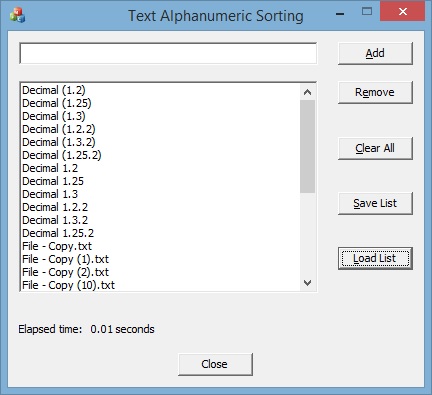
As a further test of the alphanumeric-ordering classes, I wrote a program (TextANSort.exe, 103 KB) to sort lines of text alphanumerically. The results from this program can be saved to a file.
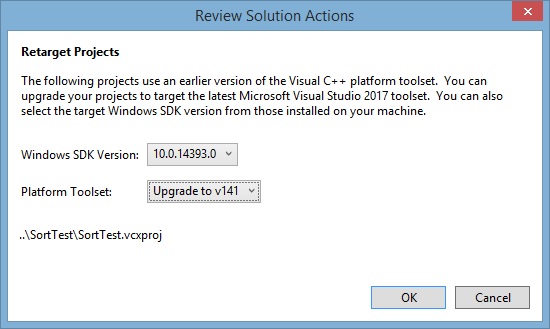
I recompiled SortTest and TextANSort with Visual Studio 2017. No code changes were needed. When I first loaded the associated solution files, I saw the following window and clicked on the OK button (shown here for SortTest).
Here are the new files: SortTest-VS17.exe (94 KB) and TextANSort-VS17.exe (106 KB).
ANOwithSTL.zip (4 KB)
contains a sample program that implements simple alphanumeric
ordering in an STL multiset. SANOCompare.cpp implements less-than
in operator() (const std::string s1, const std::string s2).
If you uncomment the first line of this function and comment
out the second one, it will call the revised source code by using
std::string::c_str() to retrieve a constant C string.
If you leave operator() as it is, it will call a
version of SimpleANCompare that operates on C++
strings by using iterators. Since atoi does not
operate on standard strings or iterators, another function (stoi)
is implemented in SANOCompare.cpp. The standard implementation of
stoi is not useful here since it starts at the
beginning of a standard string and may throw exceptions.
ANOwithSTL.cpp contains the following lines:
std::multiset<std::string, CSANOCompare>::iterator iter;
for (iter = strSet.begin(); iter != strSet.end(); ++iter) {
This could be simplified by using the auto keyword.
for (auto iter = strSet.begin(); iter != strSet.end(); ++iter) {
