
CopyFolder 2.0 is a freemium filtered backup program that copies your files in their original formats. As a result, you can access your copied files without using this program. After using the preview feature to generate a list of files to copy and making any adjustments to this list, you can press the Copy button and then do something else while this program runs. Unless you tell it otherwise, CopyFolder will run unattended after initial validation until it copies all the files it can and presents a summary report.
CopyFolder provides many options for copying the contents of one folder to another. Subfolders can be filtered by paths, names or patterns and may or may not include their subfolders. File names can be filtered by patterns. Files can be filtered by paths, dates, sizes or attributes and may optionally include typos. It has various overwrite and dispose options, including file versions. With an external compare program, text files can be compared before copying to see differences. Files can be compared after copying to verify accurate copying. It can delete destination files that are not in the source folder. It can detect files that may have been moved or renamed. It can copy a folder tree without copying files. It includes a preview feature. In premium mode, it allows defining and running queues of configurations, which are sets of settings. It uses an adaptive memory area for faster copying of large files. Under certain circumstances, it can copy file-security settings.
The premium features are network paths (Folders, Subfolders, and Paths pages), versions beyond three (Existing Files page), File Security page, and Queues page (including scheduler).
CopyFolder requires Windows XP or Windows Server 2003, or later. Copying file-security settings requires administrator privileges. This freemium program does not contain any adware or spyware. (Premium fee: $9.99. Upgrade fee: $0. Released on 16-May-2025.)
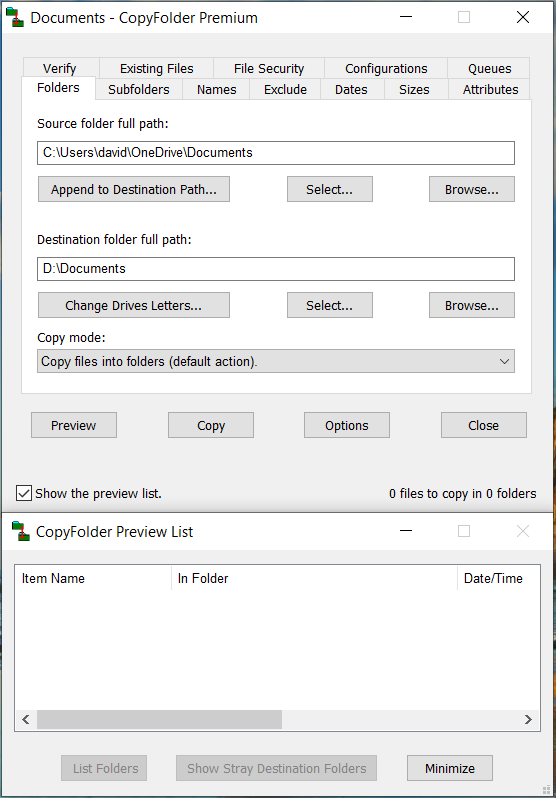
CopyFolder Display
CopyFolderInstaller2.0.zip (1987 KB)
Right click on this link, select the save option, select a location and click
Save. Then unzip this file and run CopyFolderInstaller2.0.exe to install this
program.
CopyFolder2.0-NoInstall.zip
(2044 KB)
Right click on this link, select the save option, select a location and click
Save. Then unzip this file. You may want to create a desktop
shortcut to CopyFolder.exe.
Click on a following link to open a Dropbox page. From there you download the file by clicking on the download icon near the upper right portion of the page.
CopyFolderInstaller2.0.zip (1987 KB)
CopyFolder2.0-NoInstall.zip (2044 KB)
There will be various times when I won't be able to process registrations.
Click the Options button, click on the Registration tab, and copy the displayed registration code by pressing the "Copy to Clipboard" button.
Paste this code into the text field below and then press the Buy Now button. A PayPal page will open where you can pay by credit card or through your PayPal account. After you do so and I receive notice of your payment and this code, I will send you a thank-you e-mail message with the corresponding activation code. (If I receive notice of your payment without this registration code, I will e-mail you for it.) You can register multiple copies of CopyFolder with the form below — just enter the registration codes separated by spaces, press the Buy Now button, edit the quantity on the PayPal page to match the number of registration codes and click on the Update link before paying through PayPal.
Processing registrations is a manual process. There will be delays due to waiting for PayPal to notify me of a payment, my generating an activation code, my sending it to you, and your receiving it.
Enter this activation code into the corresponding field of the Registration page and press Apply or OK to register your copy of this program.
If you have suggestions for improving CopyFolder or find any problems with it, please send them to me at the email address below.
david.wincelberg@gmail.com
Return to main page.
Last updated: 11-June-2025
