Description
Changes
ZIP File with Install Program
Registering/Buying DiskSizes
Awards and Links
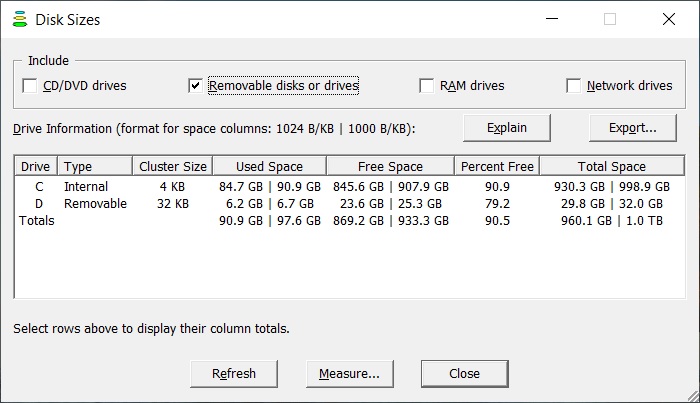
DiskSizes 2.1 shows status information about your computer's disks or drives. This information includes drive type, cluster size, used space, free space, percent free, total space, and drive totals. You can select including CD/DVD, removable, RAM (Random Access Memory) and network drives. Files are stored in an integral number of clusters (or allocation units). Disk sizes may be based on powers of 1000 or 1024. When 1000 is selected, a megabyte is a million bytes, a gigabyte is a billion bytes and a terabyte is a trillion bytes.
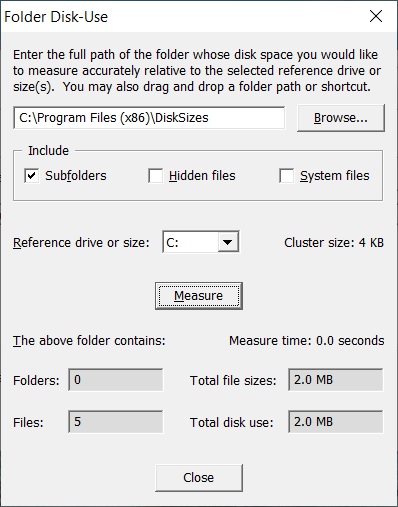
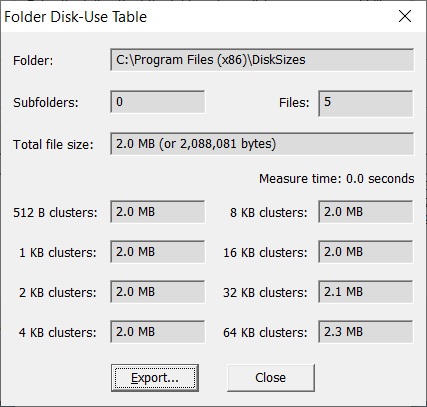
It can also measure a folder's disk use and display the number of subfolders, number of files, sum of the file sizes and total disk use. Hidden and system files may be included or excluded. Total disk use may be relative to the cluster size on any of your computer's drives that has a disk in it. It may also be relative to a selected size or all of the listed sizes. In the last case, this information may be exported to a text file and is useful for determining the range of disk use for a program or other file set. This information may also be useful when you are planning to store or copy many files. DiskSizes requires Windows XP or Windows Server 2003 or later and does not contain any adware or spyware. (Trial period: 15 days. One-time fee: $4.99. Released on 15-June-2022.)
 |
 |
Install package: DiskSizes2.1.zip
(928 KB)
Right click on this link, select "Save link as,"
select a location and click Save. Then unzip this file and run
DiskSizesInstaller2.1.exe to install this program. See here for more information.
back to top
Press the Buy Now button. A PayPal page will open where you can pay by credit card or through your PayPal account. To register multiple copies of DiskSizes, edit the quantity on this page.
Last updated: 12-July-2022
